The AI Voice Changer Just Got a Big Silence Fix
A walkthrough of the updated ChangeLyric voice changer: no more manual clipping, better silence handling, how to run a conversion, picking voices with tags, and training your own custom models.
Posted by
 William H. Mason
Related reading
How to Change Your Voice to Match Any Singer
The full workflow I use to make my voice match any singer: sing a rough guide vocal, train a voice model, and run the full song pass in Overdub Studio.
How to Replicate Horizon in Overdub Studio
Horizon is not going anywhere. Here is where to find it now, and how Manual Extension in Overdub Studio replicates its exact start and end time workflow.
Overdub Studio: Lyric Swapping, Rebuilt
Overdub Studio replaces the old Overdub and Horizon tools with one guided workflow: tagged lyrics, multiple generation strategies, take comping, and stem downloads.
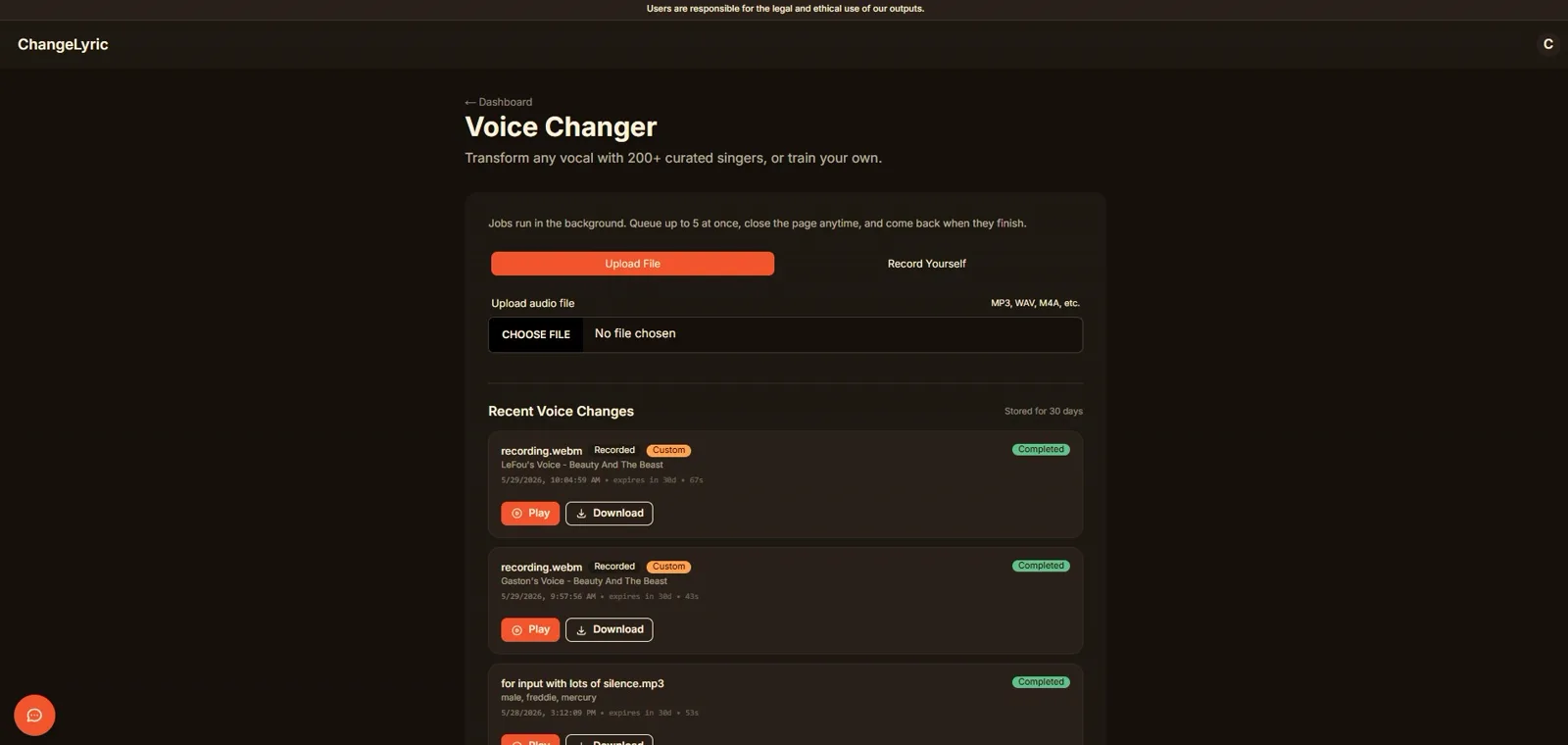
I just shipped a patch to the voice changer that fixes the most annoying problem it had. For a long time the underlying models choked on silence and quiet audio. That meant the only reliable workflow was to manually clip your vocal into smaller pieces, convert each one, and space them back out on the timeline.
That is gone now. You can leave a vocal where it belongs in the full timeline and let the tool convert the whole thing in one pass. No manual clipping, no sections that fizzle out into noise.
This post walks through what changed and how to actually use the tool end to end. If you would rather watch than read, here is the full walkthrough.
Chapters
- 0:00Intro: what's new in the voice changer
- 0:14The silence problem with RVC models (and why it mattered)
- 0:44The new patch: silence handling and normalization fix
- 1:00Before and after demo: converting to Freddie Mercury's voice
- 1:14Why you no longer need to manually clip audio
- 1:35How to run a conversion: upload or record
- 1:46Picking a voice with tags (names, genres, eras)
- 2:18Training your own custom models
- 2:33Prep tips: isolate vocals, remove reverb and delay
- 3:00Data augmentation for short audio clips
- 3:16When to use the voice changer (real use cases)
Why Silence Was Such a Problem
The voice changer runs on retrieval-based voice conversion, the same family of models behind the open source RVC project. These models are excellent at re-timbreing a sung phrase. They are historically bad at the gaps between phrases.
When a stretch of near silence hit the model, two things went wrong. The conversion would try to "sing" the quiet, turning breath and room tone into warbly artifacts. And the normalization stage would misread the quiet section and yank the level around, so converted vocals came out inconsistent from one part of the song to the next.
The workaround everyone landed on was tedious. You chopped the vocal into individual sung chunks, converted each chunk on its own, then rebuilt the spacing by hand in a DAW. It worked, but it turned a two minute job into a half hour of timeline surgery.
What the Patch Actually Fixes
The update changes two things under the hood: how the tool detects and handles silence, and how it normalizes levels across the whole file. Quiet sections are now left alone instead of being forced through conversion. Loudness is measured across the full performance, so a soft verse and a belted chorus come back balanced.
The practical result is the part everyone cares about. You can feed in a full vocal take, with all its natural pauses and breaths, and get one clean converted track back. In the video I run a before and after on a vocal converted to Freddie Mercury, and the difference between the old fizzled output and the new clean pass is obvious.
How to Run a Conversion
There are two ways to get audio into the voice changer tool. You can upload a file (MP3, WAV, M4A, and similar formats all work), or you can record yourself singing directly in the browser. Recording is handy when you just want to test a target voice on a quick idea.
For the cleanest results, feed it an isolated vocal rather than a full mix. If your audio still has instrumentals or backing vocals baked in, run it through a stem separator first. A free tool like Ultimate Vocal Remover handles this well, and the voice changer also has cleanup options for instrumentals, reverb, and backing vocals.
Picking a Voice With Tags
You choose your target voice with tags. The simplest approach is a name: type something like "Freddie Mercury" or "Britney Spears" and the tool maps it to a matching voice. You are not cloning that exact person, you are steering toward that kind of vocal character.
You can also describe an era or a style instead of a name. Tags like "disco female 1970s" or "gritty male rock" push the result toward a sound rather than a specific singer. This is the better move when you want a vibe and do not have one artist in mind.
Either way, the voice changer ships with 200+ curated singers, and any model you train yourself shows up in the same picker under "My voices." That brings us to the part most people skip.
Ready to Transform Your First Song?
Join thousands of producers & clients who use ChangeLyric.
✓ Free trial available ✓ No content moderation ✓ Cancel anytime
Training Your Own Custom Models
If none of the curated voices are right, you can train your own from a recording. The tool accepts anywhere from one to thirty minutes of audio. More clean data generally means a better model, but the floor is genuinely low now.
The single most important rule is to use solo vocals only. No group vocals, no gang vocals, no counter harmony. The model needs to learn one voice, and stacked or layered vocals confuse it into averaging everything together.
Prep your training audio before you upload it. Remove reverb and delay so the model has less to untangle and can focus on the raw timbre. A dedicated cleanup pass in something like iZotope RX or even careful editing in Audacity makes a real difference here.
Short on Audio? Augmentation Helps
You do not need a huge library to train something usable. The tool now augments small data sets, applying transformations to squeeze more performance out of even a one minute clip. This is the same data augmentation idea used across machine learning: synthetically expand a small set so the model sees more variation.
It is not magic. A minute of clean solo vocal will still train a more limited model than thirty minutes of it. But the augmentation means a short clip is no longer a dead end, which is a big deal if all you have is one good take.
When the Voice Changer Is the Right Tool
There are two situations where I reach for the voice changer constantly. The first is when AI vocal generation will not land the phrasing on a single line, and I would rather just sing it myself and convert the result. I dug into why that mismatch happens in this breakdown of AI vocal matching.
The second is cleanup after generation. If you render a vocal in a tool like Suno and the performance is good but the voice is not what you want, a conversion fixes the character without forcing you to reroll the whole track. It pairs naturally with a lyric pass, so you can swap the words in a song and then reshape the voice that sings them.
Voice conversion is one tool in a larger production chain, not a one click button. If you want a finished result without doing the production yourself, you can always have our team handle it for you.
Frequently Asked Questions
No. The latest patch fixes the silence handling and normalization issues that made manual clipping necessary. You can now leave a vocal in its full timeline position, including all its natural pauses, and convert the whole take in one pass.
You choose a target voice with tags. You can type a name like Freddie Mercury or Britney Spears, or describe an era or style with tags like 'disco female 1970s'. The tool ships with 200+ curated singers, plus any custom models you train yourself.
Anywhere from one to thirty minutes of isolated solo vocals. More clean data generally produces a better model, but the tool now augments small data sets, so even a one minute clip can train something usable.
Use solo vocals only, with no group vocals, gang vocals, or counter harmony. Remove reverb and delay before training so the model can focus on the raw vocal timbre. Isolating the vocal from any instrumental first also improves results.
Use it when AI vocal generation will not deliver the right phrasing on a line you would rather sing yourself, or when you have rendered a vocal in a tool like Suno and want it to sound more like a target singer. It is a production tool in a larger chain, not a one click solution.
Try the Updated Voice Changer
Convert any vocal with 200+ curated singers, or train your own model from as little as a minute of audio. No more manual clipping.
Open the Voice Changer